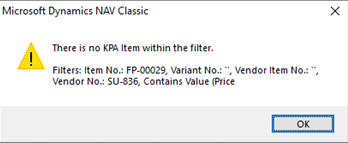
Ref.: - Message - There is no KPA Item within the filter
Trying to receive a purchase order on an OMBP ref errors.
Issue
Resolution
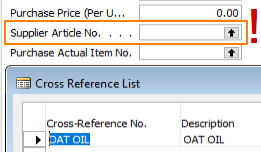
Select the relevant entry ensuring the field Unit of Measure is not equal to KG.
Steps
Issue
Trying to receive a purchase order on an OMBP ref fails with error message "There is no KPA Item within the filter".
Resolution
Select the Purchase tab & check if the field Supplier Article No. is blank. If so, click the drill-down arrow to check for an option in the Cross Reference List.
Select the relevant entry ensuring the field Unit of Measure is not equal to KG.
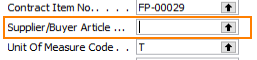
Optionally, open the linked Purchase Contract & check field Supplier/Buyer Article as this is probably blank too. With confirmation from the Salesperson, set the correct option in the contract.
Steps
- Check ref. purchase tab Supplier Article No. is blank
- Set an option from the Cross Reference List.
- Option - Check Purchase Contract field Supplier/Buyer Article for a missing selection, correct the contract.
Template v0.03, MPE, 08/11/2022
Related Articles
Ref.: - Message - Item <any item code> is not on inventory
Problem trying to receive picked up inventory from Transit. Issue Navision function Actions -> Receive Purchase/Transfer results in an error message: Checking the General tab shows a value in Quantity Received. Checking the Receive/Ship tab shows a ...Contract: Message - NAV Contract No. must have a value in Contract Header
Issue The system is prompting for a Nav. Contract No. when you make a new contract in Business Central. Resolution Working in Business Central 'Live' or 'Prod.' (e.g. 200) The Production companies e.g. Solutions may be configured to require data in ...Ref.: - Message - Quantity Received must be 0 in MBP Ref No. No.=000-123456
Problem trying to receive & ship a direct delivery ref. where the Quantity Received has a value on the Ref. General tab. Issue Navision function Actions -> Receive Purchase/Transfer results in an error message: Checking the General tab shows a value ...Contract: - Message - You may not enter numbers manually. Contract list error.
No contracts are displaying when opening the contract list from the Contract form (with F5). Issue Contract listing is filtered to one entry only but the full list can be seen in module Contract List. The system presents the following warning ...Correction - Message - "Validation Results, Item tracking defined for item 'XX-123' in Purchase Line accounts for more than the quantity you have entered.
Correction of the received weight on a purchase ref. Issue A purchase ref. has been received (Use Pickup = 'off') but the weight received is incorrect & the system will not allow a new value to be entered into Expected Purchase Qty due to a tracking ...