Contract: - Message - You may not enter numbers manually. Contract list error.
No contracts are displaying when opening the contract list from the Contract form (with F5).
Issue
Contract listing is filtered to one entry only but the full list can be seen in module Contract List.
The system presents the following warning message:
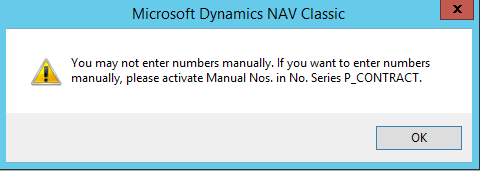
The system presents the following warning message:
Resolution
This can happen when you open two Navision sessions & apply a filter in session A, then close A but continue working in session B.
Alternatively, working within a single Nav. session, you apply a filter & then change into another company but find the contracts 'missing'.
Alternatively, working within a single Nav. session, you apply a filter & then change into another company but find the contracts 'missing'.
Quickest & simplest fix is to change back into the last company you worked in if you recall which it was & release the filter.
If that fails, try the following:
Steps
- Change into the Training company, open module Contract, click into the Contract No. field, press F5, click ‘Show All’ in the Nav. filter pane (or use Ctrl+Shift+F7)
- Open module Contract List, click Show All, close it.
- Change back into the company which is showing the problem & recheck the Contracts module.
If that does not release the filter, try the following:
- Open the Contract module & then check the Table Filter is empty (Ctrl+F7)
- Check the status of the FlowFilter. The values displayed should align with the contract No. in view.
- Should step #2 not work, even if the values do match the displayed contract, clear them & exit the filter. Re-try list access in Contract.
- Request a support call over Teams.

Remember, please close any second Navision sessions as soon as you have finished actively working with it.
Template v0.03, MPE, 08/11/2022
Related Articles
Contract: Message - NAV Contract No. must have a value in Contract Header
Issue The system is prompting for a Nav. Contract No. when you make a new contract in Business Central. Resolution Working in Business Central 'Live' or 'Prod.' (e.g. 200) The Production companies e.g. Solutions may be configured to require data in ...Ref.: - Message - There is no KPA Item within the filter
Trying to receive a purchase order on an OMBP ref errors. Issue Trying to receive a purchase order on an OMBP ref fails with error message "There is no KPA Item within the filter". Resolution Select the Purchase tab & check if the field Supplier ...Variable Pricing Error Message
There may have been times that a Contract has been changed from a Purchase to a Sales when there are already line items present. This scenario can cause knock on affects. One such instance is when creating a variable price on the Contract. Error ...General: - Lists & filtering
Create custom filters for quick drill-down to defined data in any list e.g. References, Contracts, Vendors etc. Issue Rather than the full unfiltered list, you may wish to save a custom filter called a 'View' for quick access to recurring data sets. ...Ref.: - Message - Item <any item code> is not on inventory
Problem trying to receive picked up inventory from Transit. Issue Navision function Actions -> Receive Purchase/Transfer results in an error message: Checking the General tab shows a value in Quantity Received. Checking the Receive/Ship tab shows a ...