Ref.: - Message - Quantity Received must be 0 in MBP Ref No. No.=000-123456
Problem trying to receive & ship a direct delivery ref. where the Quantity Received has a value on the Ref. General tab.
Issue
Navision function Actions -> Receive Purchase/Transfer results in an error message:
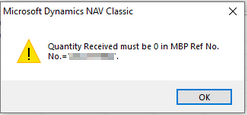
Checking the General tab shows a value in Quantity Received.
Checking the Receive/Ship tab shows a PR document number in field Pickup Received.
Checking Item Ledger Entries for the ref shows that the lot number is in the Transit location.
Checking the ref. Documents section (probably) shows no Transfer Header / TRxxxxx
You can't ship the sale as the lot has not been received from the Transit location into the DL location.
Resolution
This can be resolved by making a Transfer Order if access to the Purchase module is available or directly in the existing Ref. if not.
 It can also be done by making a separate transfer Ref or shipping the sale directly from the Transit location.
Steps
- Change Ref.
type to Transfer
- Transfer
tab - set destination to DL
- Movement
tab - set
Stock site = Temp
Stock location = Transit
Destination site = DL
Destination location = DL - Create a Transfer Order with MBP Ref. -> Create Transfer Order
- Open
the transfer order manually
- Set Transfer-from code = Transit (click yes to msg)
- Set Transfer-to code = DL (click yes to msg)
- Set
In-transit code = IN-TRANSIT
- Set
Posting date = Expected-To stock date / delivery date
- Set
Shipment date on Transfer-from tab
- Set
tracking:
Line -> Item Tracking Lines -> Shipment with correct lot# (same as ref#) - Esc
from tracking
- Recheck Posting & Shipment dates are correct
- Post
transfer
Posting -> Post -> Ship
Posting -> Post -> Receive

Care - the document on screen is is now another/someone else's TO as the system moves to the next once posted - do not edit!
15. Esc/Close
Transfer order
16. Change Ref. Type back to Direct Delivery
The inventory/lot should now be in the DL location (check with Tank Availability report or Item Ledger Entries) & normal shipment possible.
Template v0.03, MPE, 08/11/2022
Related Articles
Ref.: - Message - Item <any item code> is not on inventory
Problem trying to receive picked up inventory from Transit. Issue Navision function Actions -> Receive Purchase/Transfer results in an error message: Checking the General tab shows a value in Quantity Received. Checking the Receive/Ship tab shows a ...Correction: change purchase contract number on a DL ref. when quantity is received (but not invoiced), sale is shipped, invoiced & transit has not been used
Correction: change purchase contract number on a DL ref. when quantity is received (but not invoiced), sale is shipped, invoiced & transit has not been used. Issue A direct delivery ref. has been made & processed all the way through to the sales ...Correction - Message - "Validation Results, Item tracking defined for item 'XX-123' in Purchase Line accounts for more than the quantity you have entered.
Correction of the received weight on a purchase ref. Issue A purchase ref. has been received (Use Pickup = 'off') but the weight received is incorrect & the system will not allow a new value to be entered into Expected Purchase Qty due to a tracking ...Contract: Message - NAV Contract No. must have a value in Contract Header
Issue The system is prompting for a Nav. Contract No. when you make a new contract in Business Central. Resolution Working in Business Central 'Live' or 'Prod.' (e.g. 200) The Production companies e.g. Solutions may be configured to require data in ...Ref.: - Message - There is no KPA Item within the filter
Trying to receive a purchase order on an OMBP ref errors. Issue Trying to receive a purchase order on an OMBP ref fails with error message "There is no KPA Item within the filter". Resolution Select the Purchase tab & check if the field Supplier ...